THE "BACK SEAT" GUIDE TO UNDERSTANDING WI-FI
INFRASTRUCTURED.io
OVERVIEW
If you grew up in the 80s, you might remember the station wagon with the foldable third-row seat that faced backward. We called it “the very back seat.”
That’s where we’re going.
Because to really understand Wi-Fi, you have to start in the very back seat — not with routers or speeds, but with something more fundamental:
RADIO WAVES
RADIO WAVES: ALWAYS THERE WHETHER WE USE THEM OR NOT
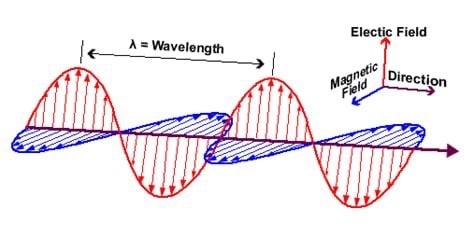
Radio waves aren’t something we invented — they already exist all around us.
They’re a form of electromagnetic radiation, and nature produces them constantly:
The sun emits radio waves along with light and heat
Lightning generates powerful radio bursts
The Earth’s atmosphere produces low-level radio noise
Even if humans disappeared tomorrow, radio waves would still exist.
SO WHAT DO WE ACTUALLY “CREATE”?
When we use Wi-Fi, we’re not creating radio waves from nothing, we’re creating controlled radio waves.
We do this by pushing electrical signals through an antenna, which converts those signals into electromagnetic waves that travel through space.
That leads to the real question: How do we put date onto a radio wave?
THE WAVE IS THE DATA
We don’t add data on top of a wave.
We shape the wave itself so that it becomes the data.
Start with a simple electrical signal, a smooth, repeating wave. This is called a carrier wave. By itself, it carries no information.
To encode data, we modify the properties of that wave:
Amplitude (how tall it is)
Frequency (how fast it oscillates)
Phase (where the wave starts)
Each of these changes can represent binary data: 1s and 0s.
Once shaped, that electrical signal is sent to an antenna, which radiates it into space as a radio wave.
At that point, the radio wave already contains the data, because its shape has been altered.
FROM BITS TO SYMBOLS
Let’s define two key terms:
Bit = the smallest unit of data (0 or 1)
Symbol = a specific “state” of the signal at a moment in time
A symbol is essentially the shape of the wave during a tiny time slice, and that shape represents one or more bits.
THE SIMPLEST CASE: BPSK
The most basic way to encode data is called Binary Phase Shift Keying (BPSK).
It works like this:
Normal wave → 0
180° flipped wave → 1
That’s it.
Binary = two states
Phase Shift = we change the phase
Keying = we switch between them
In this case: 1 symbol = 1 bit
Simple, reliable… but slow.
MODERN WIFI: PACKING MORE INTO EACH SYMBOL
Wi-Fi doesn’t stop at 1 bit per symbol.
Instead, it uses a technique called Quadrature Amplitude Modulation (QAM), which combines:
Different amplitudes
Different phases
This creates many possible signal states.
Each unique state = a symbol
Each symbol = multiple bits
For example:
One combination = 00
Another = 01
Another = 10
Another = 11
Now:
1 symbol = multiple bits
AND IT SCALES
Here’s how modulation evolves:
BPSK = 1 bit/symbol
QPSK = 2 bits/symbol
16-QAM = 4 bits/symbol
64-QAM = 6 bits/symbol
256-QAM = 8 bits/symbol
1024-QAM = 10 bits/symbol
Modern Wi-Fi (like Wi-Fi 6) can reach: 10 bits per symbol
ONE MORE LAYER: OFDM
Wi-Fi also uses OFDM (Orthogonal Frequency Division Multiplexing).
Instead of sending data on a single frequency, it splits the signal across many smaller subcarriers and sends symbols across all of them simultaneously.
This is how Wi-Fi achieves high throughput.
A HELPFUL ANALOGY
Think of the progression like this:
Morse code → simple on/off signals (like BPSK)
Human speech → tone, pitch, rhythm (like QAM)
Wi-Fi is much closer to speech than Morse code; rich, layered, and efficient.
THE TAKEAWAY
If there’s one idea to remember, it’s this:
We are not sending data on top of a wave; the wave itself is the data.
And the better we can shape and preserve that wave, the more efficiently we can communicate.
This site is a resource under constant development, evolving alongside the technologies, markets, and strategies it aims to explain.